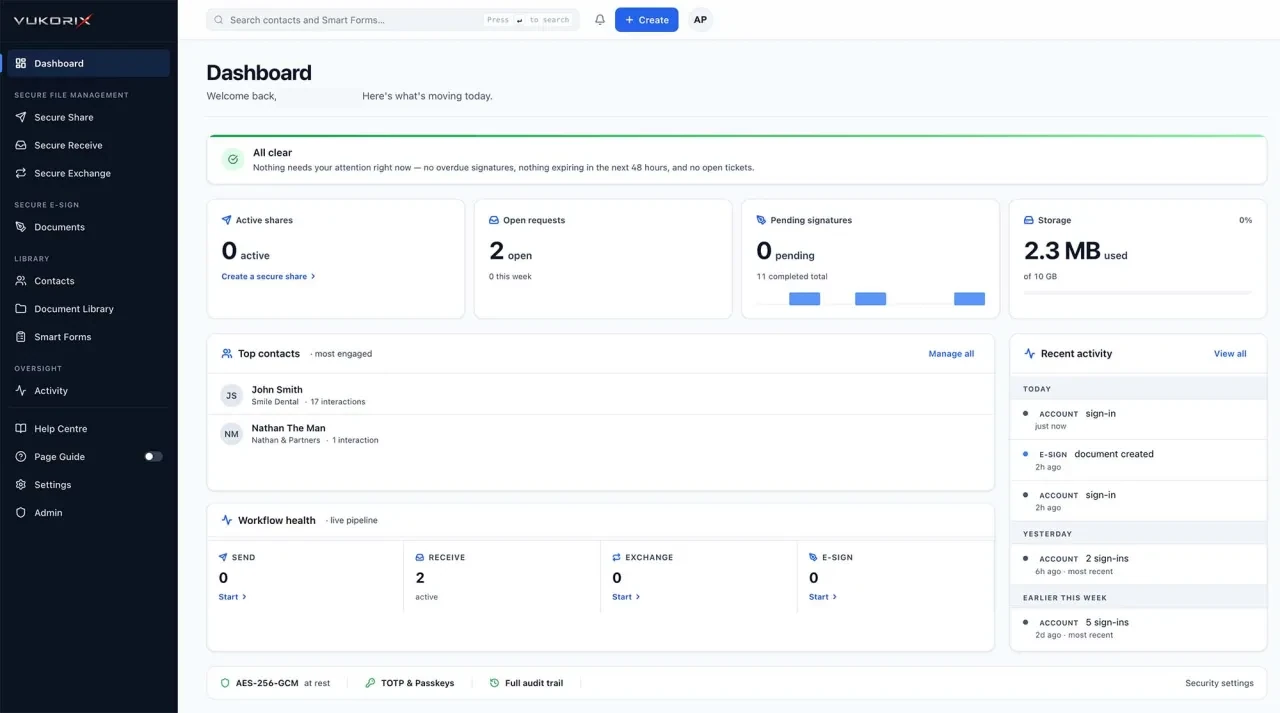
E-Sign, client uploads, secure sharing, reusable PDF templates, Smart Forms and two-way exchange in one clean platform.
Send for signature, reuse a template, build a client form, share a sensitive file, request documents or manage a two-way exchange.
Upload your PDF, place signature fields, and send. One signer or many, an audit certificate on every document, and a downloadable signed PDF. Mark up, comment, and black out sensitive text on the same page where you set up the signature.
Explore E-Sign →Reusable PDF templates organised in folders, with your most-used templates pinned to the top. One click starts a fresh draft from any template, ideal for contracts, authority forms, and engagement letters.
Explore Document Library →Encrypted links that expire automatically after a set number of views or by a deadline, protected by an optional password or PIN. Turn on Private mode and the file is locked in your browser before it leaves your computer. Vukorix has no access to it.
Explore Secure Share →A branded upload portal with a checklist for clients. In Private mode, uploads are locked in your client's browser and tied to your account. Only you can unlock them.
Explore Secure Receive →A two-way workflow for collecting documents from a client and sending documents back. Secure Exchange supports Standard encryption and Private mode for supported file transfers.
Explore Secure Exchange →Turn any PDF into an on-screen form your client fills, then get back a completed PDF. Works with PDFs that already have fillable fields, and our AI picks fields out of flat scanned PDFs too. Attach to any Secure Receive request.
Explore Smart Forms →Standard encryption supports the full Vukorix workflow. Private mode adds browser-side encryption for supported file transfers.
Files are encrypted in transit and at rest while automated Vukorix systems perform the processing required for signatures, forms, previews and other workflow features.
The file is encrypted in your browser before upload. Vukorix stores only the encrypted version, and the recipient unlocks it using the required link information or their account.
Most teams pay for these workflows as separate products, each with its own plan and invoice. Vukorix includes them in one affordable plan.
| Outcome | Vukorix | DocuSign | PandaDoc | Adobe Sign | Dropbox Sign | ShareFile |
|---|---|---|---|---|---|---|
| One affordable monthly plan | ✓ $9.99/month | ✗ Per-user | ✗ Per-user | ✗ Per-user | ✗ Per-user | ✗ Plan-based |
| 3 seats included | ✓ 3 seats | ✗ Per user | ✗ Per user | ✗ Per user | ✗ Per user | ✗ Per plan |
| E-signing with audit trail | ✓ | ✓ | ✓ | ✓ | ✓ | ✗ Add-on |
| Secure file sharing | ✓ | ✗ Separate product | ✗ Separate product | ✗ Separate product | ✗ Separate product | ✓ |
| Client upload portal | ✓ | ✗ Higher tier | ✗ Higher tier | ✗ Higher tier | ✗ Separate product | ✓ |
| Reusable document library | ✓ | ✗ Higher tier | ✗ Higher tier | ✗ Higher tier | ✗ Separate product | ✗ Separate product |
| Smart forms | ✓ | ✗ Higher tier | ✗ Higher tier | ✗ Higher tier | ✗ Separate product | ✗ Separate product |
| Secure two-way exchange | ✓ | ✗ Separate tools | ✗ Separate tools | ✗ Separate tools | ✗ Separate tools | ✗ Separate tools |
| No upgrade gates for core workflows | ✓ | ✗ Tiered plans | ✗ Tiered plans | ✗ Tiered plans | ✗ Tiered plans | ✗ Tiered plans |
Swipe sideways to compare
✓ included in the one Vukorix plan. ✗ not in one affordable plan (separate product, higher tier, add-on or per-user). Pricing and packaging can change. How we compare. Product capabilities and pricing vary by plan, region and date. Review each provider's current documentation before making a purchasing decision.
DocuSign, PandaDoc, Adobe, Adobe Acrobat, Adobe Acrobat Sign, Dropbox Sign, ShareFile and other third-party product names are trademarks of their respective owners. Vukorix is independent and is not affiliated with, endorsed by, or sponsored by those companies.
Start a Secure Share, set up a Secure Receive request, open a two-way Secure Exchange, send a document for signature, or start a new draft from a Document Library template.
Standard encryption for the workflows that need Vukorix to read the document. Private mode for the files where Vukorix should have no access to the contents. You pick per workflow, before you send.
Recipients open a branded page, no account required. You watch each step from your dashboard. When it's done, you download the files, the signed PDF, or the audit certificate.
Vukorix Business includes document signing, client uploads, secure sharing, reusable PDF templates, Smart Forms and two-way exchange.
3 seats included. Extra seats are $2.99/month. 7-day free trial, no credit card required.
Start your 7-day free trialSend PDFs, track progress and receive the completed document with an audit certificate.
Send and collect sensitive files through controlled links instead of asking clients to return them by email.
Use checklists and workflow status to see what is complete and what still needs attention.
Keep PDF templates ready and start a fresh workflow without uploading the same file again.
Add the fields your client needs, send the document through Vukorix and receive the completed PDF back.
Three seats are included. Extra seats cost $2.99/month each, without moving to a higher plan.
Vukorix was designed for the firms that get asked to sign contracts, collect ID, and exchange settlement files every day, with stakes that matter.
Vukorix offers two modes. Standard encryption stores your files on Vukorix servers with AES-256. It's used for E-Sign, Smart Forms, blackout, document previews, and the Document Library, where Vukorix needs to read the document. Private mode is end-to-end encrypted for Secure Share, Secure Receive, and Secure Exchange (files in both directions): your browser locks the file before it leaves your computer, and Vukorix only ever stores the encrypted version. Everything is also encrypted in transit when it travels over the internet.
No. Private mode is end-to-end encrypted for Secure Share, Secure Receive, and Secure Exchange (files in both directions). E-Sign, Smart Forms, blackout, document previews, the Document Library, and Standard Exchange messaging use Standard encryption (encrypted on Vukorix servers) because Vukorix needs to read the document to perform those workflows.
Vukorix consolidates e-signature, secure file sharing, client document request portals, and reusable PDF template libraries into one flat $9.99/month plan, with 3 seats included.
$9.99 per month. Includes 3 team-member seats. Extra seats are $2.99 each per month. Unlimited signatures, unlimited shares, unlimited exchanges. 7-day free trial, no credit card required.
Yes. If your PDF already has fillable fields built in, Vukorix picks them up automatically with their original positions and types. A green banner confirms when it worked. If your PDF is a flat scan with no built-in fields, our AI finds the fields by looking at the page and you do a quick alignment check in the editor before sending. Smart Forms uses Standard encryption because Vukorix needs to read your PDF to set up and process the form.
Yes: permanent blackout for PDFs. Inside the Smart Forms editor and the E-Sign edit page, you draw rectangles over the text you want to hide. Vukorix re-renders the page as an image so nothing under the blackout can be copied, pasted, or recovered. It's a manual tool. Vukorix doesn't automatically scan for sensitive data. Word and Excel files must be saved as PDF first.
No. Private mode is designed so that Vukorix has no access to the file, and never holds its unlock key. The key either lives inside the link you share, or is tied to the recipient's account. Keep the recipient link and any passwords safe.
Vukorix engineering documentation, code, and architecture are tracked in detail. An independent external cryptographic audit has not been completed at this time; we will publish the external-audit status when one is available. Until then, our public claims (SOC 2-ready architecture and GDPR-aligned design) are deliberately scoped to architectural properties we can demonstrate in code.
Email and password with extra verification required, Sign in with Google, Sign in with Microsoft, passkeys, authenticator apps (Google Authenticator, Authy, 1Password, etc.), and SMS codes in supported countries. Every action your team takes is logged in the audit trail, no matter which sign-in method was used.
A template is a reusable PDF stored in your Document Library: a sales authority, an engagement letter, a privacy notice, a standard NDA. You store the PDF once, then click Use template to start a fresh E-Sign draft any time you need to send it to a new client. The original template stays untouched. Templates use Standard encryption. They're stored on Vukorix servers with AES-256, because Vukorix needs to read the PDF to start new drafts from it.
Vukorix is currently focused on clean standalone document workflows. Teams can download completed files and audit packs for storage in their existing systems. Integrations can be considered based on customer demand.
No credit card required. Send your first signature, exchange, or share in under five minutes.